

Free Social Media Image Resizer
This free social media image resizer fits a photo to Instagram, TikTok, YouTube, Facebook, LinkedIn and X sizes. Pick a preset, crop to fill or keep the whole photo, and download a PNG.
Drop your image here
or click to browse. JPG, PNG, WebP and more
Social Media Image Sizes in One Free Resizer
Eleven size presets for six platforms, three fit modes and a custom size box. You get one PNG at the exact pixel size you picked.
Resize for Instagram, TikTok and YouTube
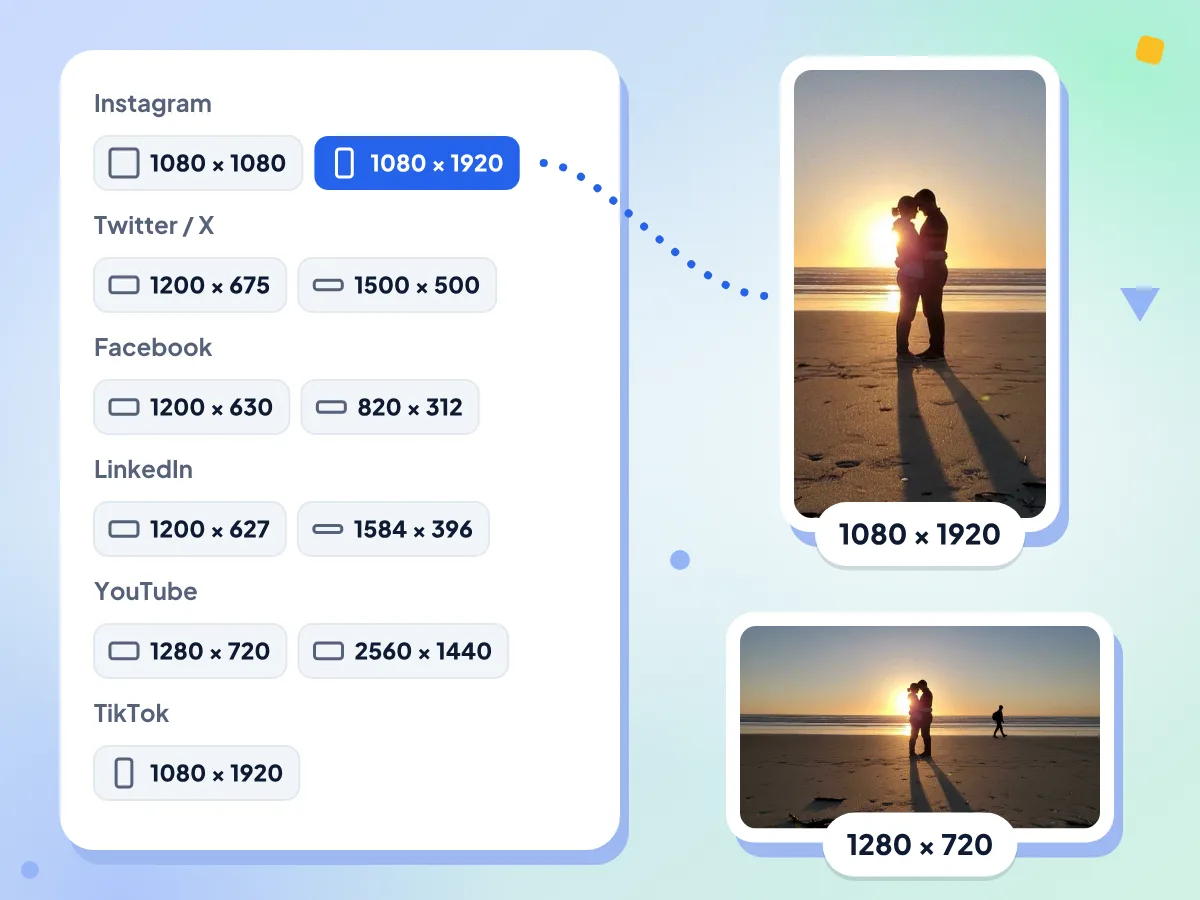
Pick a platform, then a preset, and the width and height fill in. Choose Instagram Post or Story / Reel, TikTok Cover, YouTube Thumbnail or Channel Art, plus X, Facebook and LinkedIn sizes.
- 11 presets across 6 platforms
- Story, Reel and TikTok Cover: 1080 × 1920
- YouTube Thumbnail: 1280 × 720
Crop to Fill or Fit Without Cropping
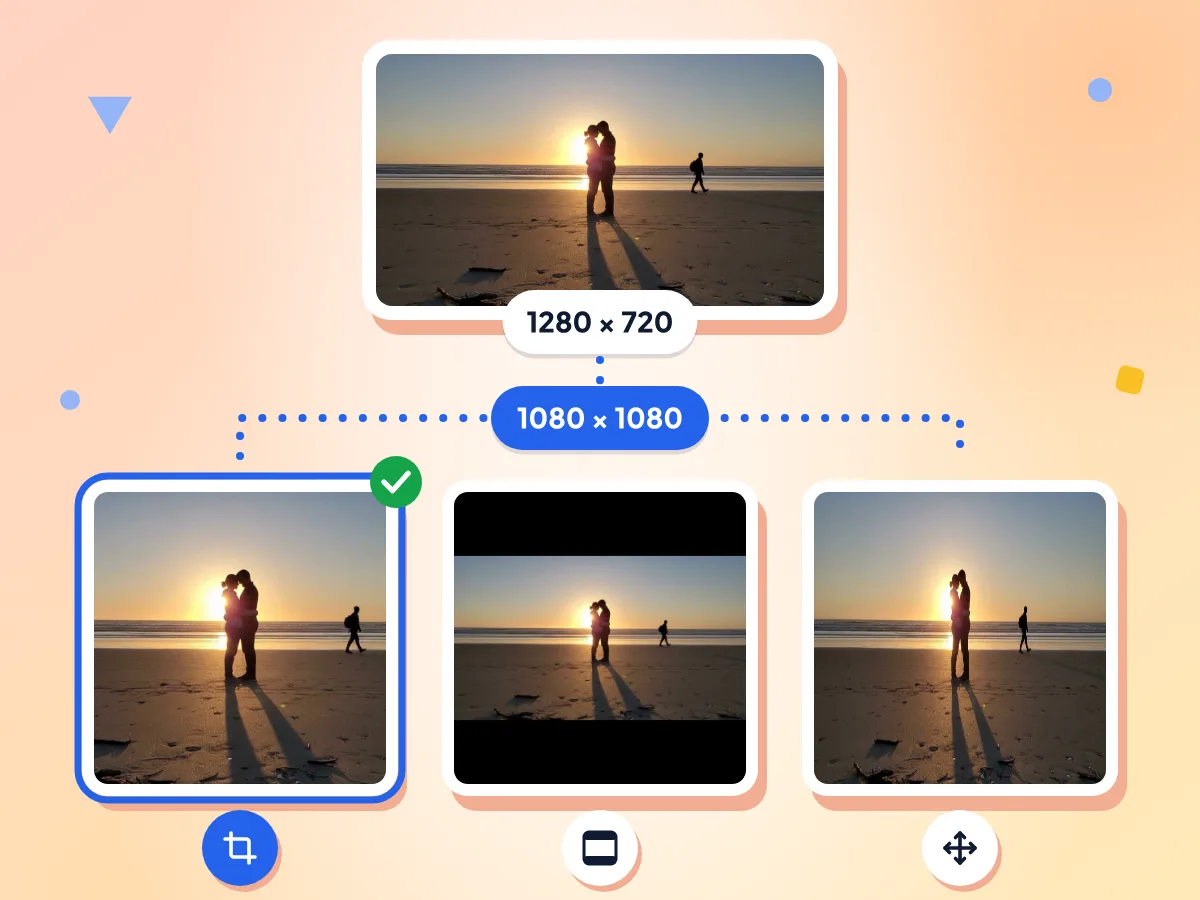
Cover fills the frame and trims the edges evenly from the center. Letterbox keeps the whole photo and adds black bars. Stretch fills the exact size, even if the photo gets squashed.
- Cover crops from the center
- Letterbox bars are always black
- Cover is the default fit mode
See the Result Before Saving
Click Resize Image and the preview switches to the new version, with its pixel size and file name above it. Change the preset or fit mode, then resize again until it looks right.
PNG Output, No Watermark
Every result saves as a PNG named after your photo and its new size, like photo-1080x1080.png. PNG adds no compression loss, but files are often larger than a JPG.
Any Custom Width and Height
Click Custom or type in the Width and Height boxes to set any size in pixels, such as 1080 × 1350 for a portrait post. The boxes are set up for 1 to 8,000 px.
Your Photo Stays on Your Device
The resizing happens in your browser tab, so the picture itself never reaches us. We only count anonymous usage, such as the preset, size and fit mode you chose.
How to Resize for Social Media in 3 Steps
Add one image.
Drop a JPG, PNG, WebP or other photo your browser can open onto the box, or click to choose it. The editor opens with your photo loaded.
Pick a preset and fit.
Choose a size such as Instagram Post or YouTube Thumbnail, or type your own width and height. Then choose Cover, Letterbox or Stretch.
Resize and download.
Click Resize Image, check the preview and its size, then click Download to save the PNG. Pick another preset to make the next size.
Who Uses the Social Media Resizer
Anyone posting on more than one platform who's tired of re-cropping the same image six different ways.
Social Media Managers
Turn one campaign image into an Instagram post, an X post, a Facebook post and a LinkedIn post. The photo stays loaded, so pick each preset in turn and download each size.
- Instagram Post at 1080 × 1080 and X Post at 1200 × 675
- Facebook Post at 1200 × 630 and LinkedIn Post at 1200 × 627
- Story / Reel preset at 1080 × 1920 for vertical posts
Small Businesses & Marketing
Make page covers and banners from a product or team photo. Cover mode crops from the center, so keep the main subject in the middle of your original shot.
- Facebook Cover at 820 × 312 for a business page
- LinkedIn Banner at 1584 × 396 for your profile header
- Letterbox keeps a whole logo or product in the frame
Content Creators
Reformat one shot for vertical Stories, Reels and TikTok covers, plus a widescreen YouTube thumbnail. Use Letterbox when nothing in the frame may be cut off.
- Story / Reel and TikTok Cover presets at 1080 × 1920
- YouTube Thumbnail at 1280 × 720, a 16:9 frame
- YouTube Channel Art at 2560 × 1440 for the banner
Frequently Asked Questions
Answers to the most common questions about resizing images for social platforms.
What size is an Instagram post in this resizer?
The Instagram Post preset here is 1080 × 1080 pixels, a 1:1 square. The Story / Reel preset is 1080 × 1920, a 9:16 frame. For a 4:5 portrait post, type 1080 × 1350 into the Width and Height boxes. Check Instagram's help pages for its current limits.
What size is a YouTube thumbnail in pixels?
The YouTube Thumbnail preset makes a 1280 × 720 pixel image, a 16:9 frame. There is also a Channel Art preset at 2560 × 1440 for the banner. Both save as PNG, so if YouTube says your thumbnail file is too large, convert it to JPG first.
What size is a TikTok cover image?
The TikTok Cover preset is 1080 × 1920 pixels (9:16), the same size as the Instagram Story / Reel preset. Use Cover mode to fill the frame, and keep any text near the middle, since apps can crop the edges in grid views.
How do I resize a photo for Instagram without cropping?
Choose Letterbox (Fit) under Fit Mode. The whole photo is scaled to fit inside the preset and centered, and the leftover space is filled with black bars. The bars are always black; there is no white, color or blur option.
What is the difference between Cover, Letterbox and Stretch?
Cover (Crop) scales the photo until it fills the frame and trims the overflow evenly from the center. Letterbox (Fit) shows the whole photo with black bars. Stretch pulls it to the exact size, which squashes it when the shapes differ.
Can I choose which part of the photo is kept?
No. Cover mode always crops from the center, taking the same amount off both sides or the top and bottom. To keep an off-center subject, crop the photo first with the image cropper, then resize it here, or use Letterbox.
What format does the social media resizer save in?
Always PNG, named like photo-1080x1080.png. PNG adds no compression loss, but the file is often several times larger than a JPG. If a site asks for JPG or a smaller file, convert or compress the PNG afterward with the image converter.
Can I resize several images at once?
Not here. This page takes one photo at a time, though you can make every preset from it: pick a new size and click Resize Image again. For a batch with one shared size and a ZIP download, use the image resizer.
Why does my resized image look blurry?
Your photo was probably smaller than the preset. The tool enlarges small images to fill the size, and enlarging can't add detail. Start from the largest original you have, at least as wide as the preset, such as 1280 px wide for a YouTube thumbnail.
Why did my transparent PNG get a black background?
The resizer paints the whole frame black before drawing your image, so see-through areas turn black in every fit mode. There is no background color option. To get white, place the logo on a white background in another editor before resizing.
Why does it say it failed to resize my image?
Usually your browser can't open that file type, or a Width or Height box is empty. iPhone HEIC photos may not open outside Safari. Convert HEIC to JPG first, check that both boxes hold a number, and try again.
Is this social media resizer free and private?
Yes. It's free, with no sign-up and no watermark. Your photo is resized inside your browser tab and isn't sent to our servers. The page does report anonymous usage, like the preset, size and fit mode you used and the file's rough size.
Explore More Tools
Discover other free tools that work great alongside this one