

Free AAC Converter
Convert MP3, WAV or OGG files to AAC, or turn AAC into MP3, WAV or OGG. AAC is the format behind iTunes and Apple Music, and it sounds better than MP3 at the same bitrate.
Drop your audio files here
MP3, WAV, OGG and AAC
Max file size: 500 MB · Multiple files supported
Convert Audio to AAC in 3 Steps:
Upload your audio: MP3, WAV, OGG or AAC files, up to 500 MB each.
Choose AAC as the output and select your preferred bitrate quality.
Click Convert All, then download your AAC file.
Two or more files download together as one ZIP.
About AAC Format
A lossy audio format that delivers better sound quality than MP3 at the same or lower bitrate, and is the default audio format for Apple devices and most streaming services.
Advantages
- Better quality than MP3 at the same bitrate
- Smaller files than MP3 at equivalent quality
- Native support on all Apple devices
- Default format for YouTube, iOS, and iTunes
Disadvantages
- Lossy — audio data is discarded
- Patent licensing restrictions
- Less universal than MP3 on older hardware
- Some legacy audio players don't support it
Technical Specifications
Best Use Cases
Why Convert Audio to AAC?
AAC is a good fit for Apple devices and video, and it matches MP3 sound quality in a smaller file.
Better Quality Than MP3
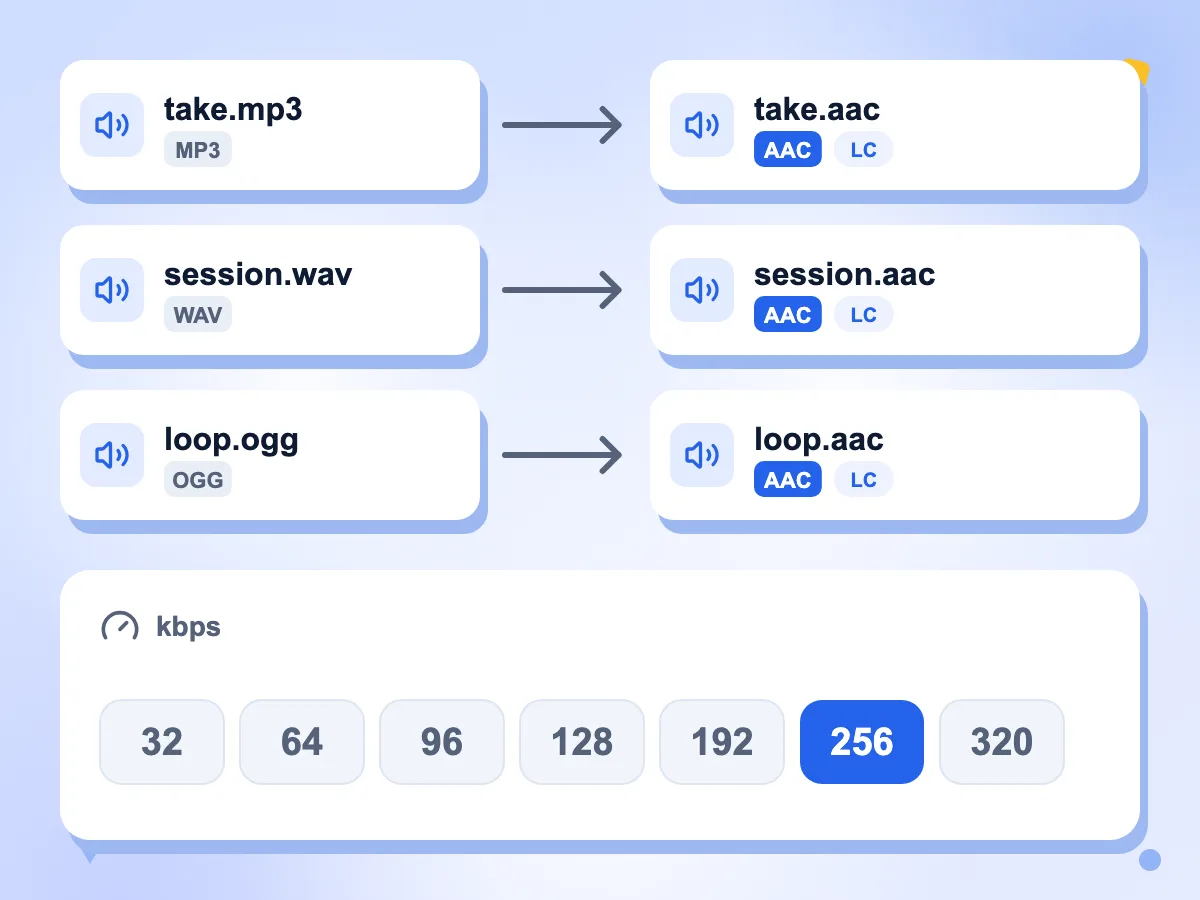
AAC (Advanced Audio Coding) sounds better than MP3 at the same bitrate, most of all at 128 kbps and below. Apple uses it for iTunes and Apple Music, and YouTube lists AAC-LC as an audio codec it accepts for uploads.
- AAC-LC encoder, source sample rate kept
- Auto requests 256 kbps for AAC
- Output is a raw .aac file
Small Files, High Fidelity
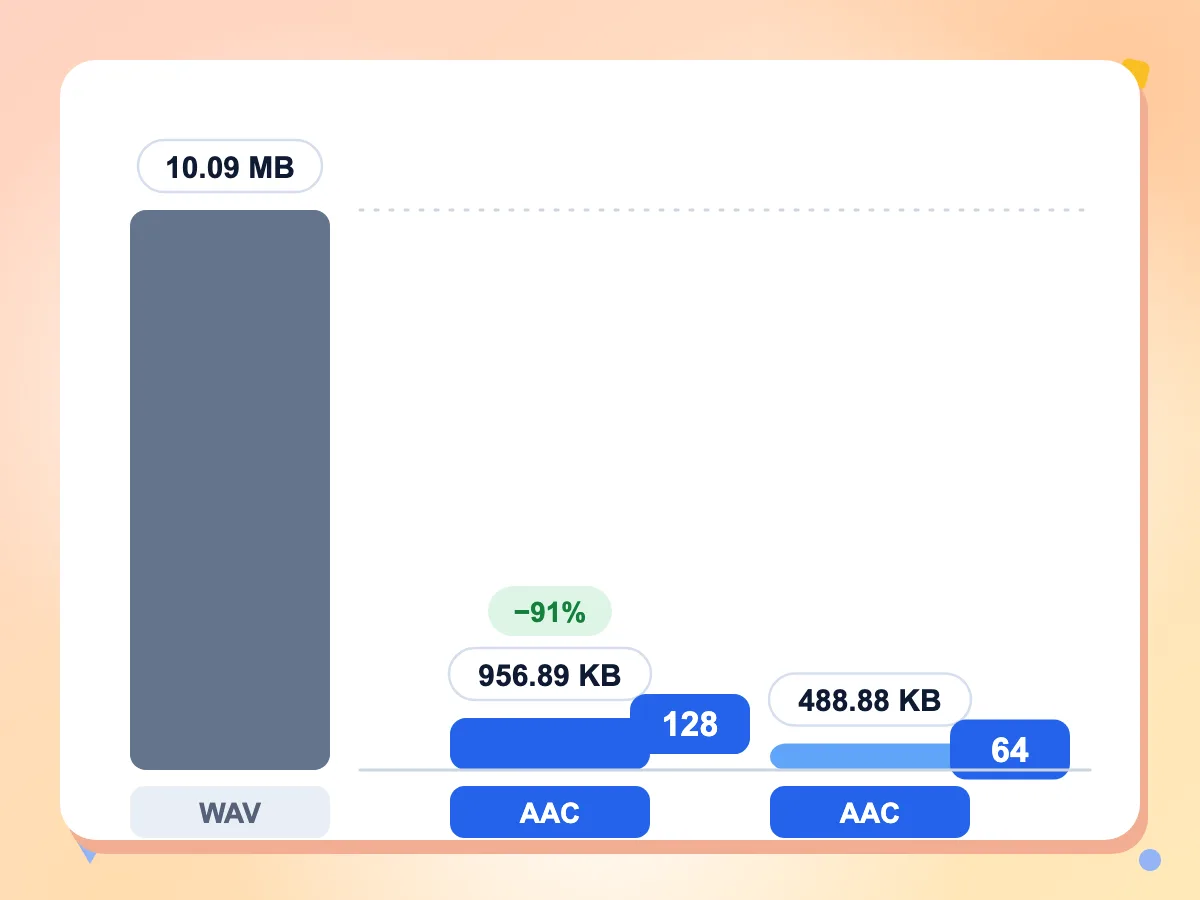
AAC sounds good at 128 to 192 kbps, which keeps music and podcasts small. Auto aims for 256 kbps, so pick 128 kbps in the Bitrate menu when size matters.
- A 60-second clip at 128 kbps: 956.89 KB
- Seven bitrate steps, 32 to 320 kbps
- 64 kbps makes the same clip 488.88 KB
Native Apple Ecosystem Support
Apple sells and streams its music in AAC, and iPhone, iPad and Mac play AAC without extra apps. This converter saves a raw .aac file, not an .m4a.
Streaming Platform Standard
YouTube's upload guide lists AAC-LC as one of its audio codecs, and most MP4 videos carry their sound as AAC. Converting a track to AAC puts it in the same format.
Frequently Asked Questions About AAC Conversion:
Common questions about AAC, M4A and picking a bitrate.
What is AAC and how is it different from MP3?
AAC (Advanced Audio Coding) is the format MPEG standardized in 1997 to follow MP3. It compresses sound more efficiently, so it sounds better than MP3 at the same bitrate, most clearly at 128 kbps and below. Apple uses AAC for iTunes and Apple Music.
What is the M4A file extension?
M4A is an MPEG-4 file that holds only audio, usually AAC. The sound inside can match a raw .aac file, but M4A can also store tags and cover art. This converter reads and writes .aac only, so .m4a files are not accepted.
Is AAC compatible with Android and non-Apple devices?
Yes. AAC is an international standard (ISO/IEC 13818-7), and Android phones, Windows Media Player and VLC all play it.
What bitrate should I use for AAC audio?
For music, 192 kbps is a good place to start. For podcasts and voice, 96 or 128 kbps is enough. Apple Music streams at 256 kbps AAC, the same rate Auto aims for here.
Can I convert Apple Music AAC files to MP3?
Not on this page. iTunes Store purchases are .m4a files, which this converter does not accept, and Apple Music downloads are DRM-protected, so they can't be converted. Plain .aac files work: pick MP3 in the Output Format menu.
Are my audio recordings safe during AAC conversion?
Yes. Your audio files never leave your device. The converter works on them inside your browser tab, and nothing is uploaded or stored on a server.
What are the technical specifications of AAC?
Advanced Audio Coding (AAC) uses lossy compression with very good quality output. It does not support transparency and does not support animation. Typical file sizes are small.
When should I use AAC format?
When you want better quality than MP3 at the same file size, especially in the Apple ecosystem. Best use cases include apple music and itunes library, streaming services audio tracks, iphone and ipad audio playback. When targeting older hardware or audio players that only reliably support MP3.
What are the advantages of AAC over other formats?
Key advantages of AAC: Better quality than MP3 at the same bitrate. Smaller files than MP3 at equivalent quality. Native support on all Apple devices. Default format for YouTube, iOS, and iTunes. However, keep in mind: lossy — audio data is discarded, patent licensing restrictions.
Who Converts Audio to AAC?
Apple Users & iTunes Library Owners:
- Convert WAV recordings to AAC to save space on an iPhone or iPad
- Convert OGG files to AAC for Apple apps that won't open OGG
- Convert .aac files to MP3 for car stereos and players that don't read AAC
Video Producers & Social Media Creators:
- Convert WAV audio tracks to AAC before exporting video for YouTube or Instagram
- Shrink a long WAV interview to AAC before sending it to a co-host or editor
- Convert voice-over recordings to AAC to keep video project files small
- Convert OGG background music to AAC for mobile apps and games
Developers & App Builders:
- Convert music and sound effects to AAC for iOS and macOS apps
- Convert WAV sound effects to AAC to reduce app bundle sizes for mobile distribution
- Convert .aac call or meeting recordings to MP3 or WAV for a transcription app
- Convert .aac files to WAV for audio tools that only read uncompressed audio
Explore More Tools
Discover other free tools that work great alongside this one
Audio Converter
Convert audio files to any format
Video Converter
Convert videos between popular formats
Video Trimmer
Trim and cut video clips in browser
MP4 to MP3
Extract audio from video files