

Convert WAV to MP3 Online Free
Shrink large WAV files into small MP3s. Pick any bitrate from 32 to 320 kbps, and your files stay on your device.
Drop your audio files here
WAV
Max file size: 500 MB · Multiple files supported
How to Convert WAV to MP3:
Drag your WAV files into the tool or click to browse.
You can add many files at once, up to 500 MB each.
Pick a bitrate in the Bitrate menu, or keep Auto (about 256 kbps).
Use 128 kbps for voice and casual listening, 192 kbps for most music, and 320 kbps for the highest MP3 setting.
Click Convert All and download the MP3 when it's ready.
Download All puts two or more files into one ZIP.
WAV vs MP3: What Changes
Understanding the differences between WAV and MP3 helps you choose the right format for your needs.
| Specification | WAV | MP3 |
|---|---|---|
| Compression | Uncompressed | Lossy |
| Quality | Excellent | Good |
| Transparency | No | No |
| Animation | No | No |
| File Size | Very Large | Small |
Why convert from WAV?
- Very large file sizes
- Not suitable for streaming
- Limited metadata support
Why choose MP3?
- Universal compatibility
- Small file sizes
- Good quality at reasonable bitrates
When to use WAV
When you need the highest audio quality and file size is not a concern.
When to use MP3
When you need universal audio compatibility and reasonable file sizes.
WAV to MP3 Conversion Features
Turn big WAV files into small MP3s and choose the bitrate
Smart Compression
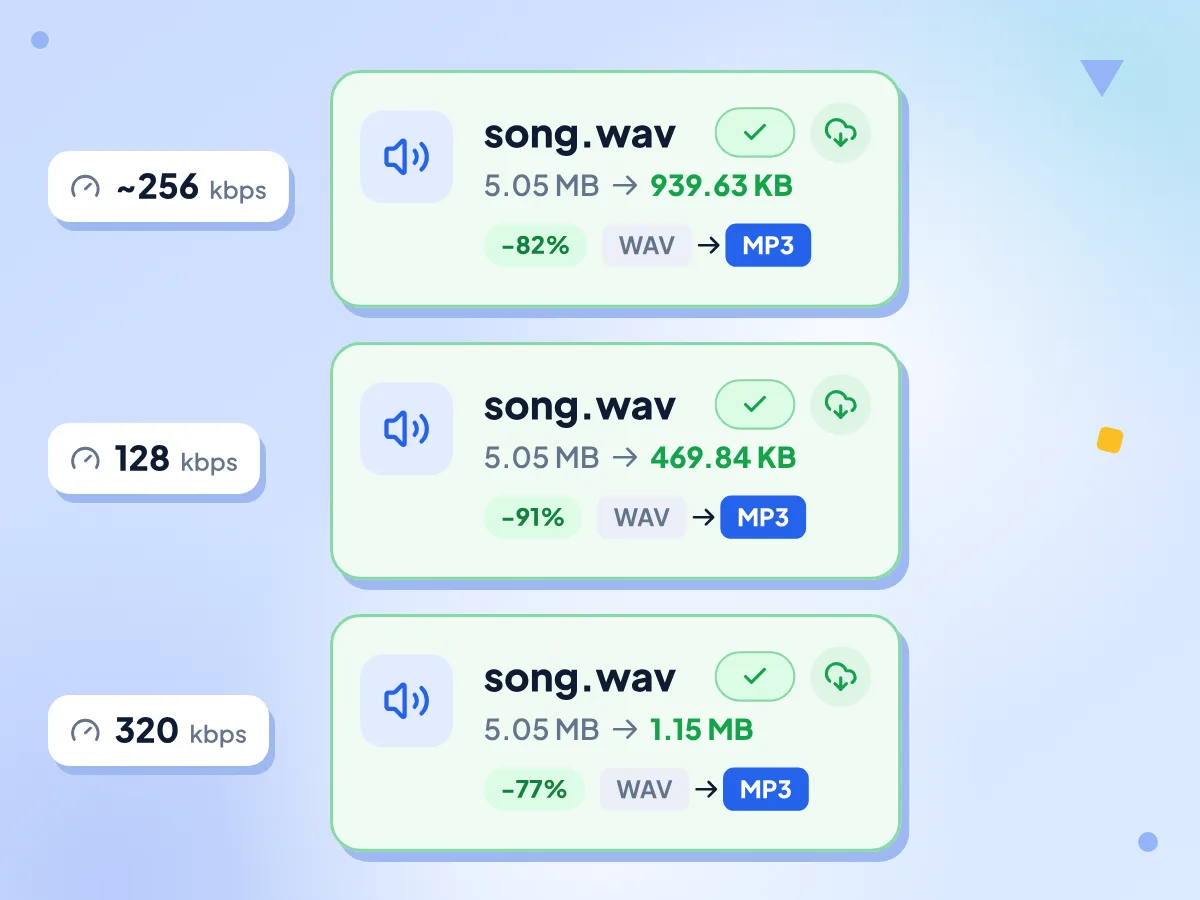
Choose Auto or a bitrate from 32 to 320 kbps. Lower settings make smaller files, and higher ones keep more detail.
- Seven bitrates from 32 to 320 kbps
- Auto is about 256 kbps
- Title and artist tags carry over
Dramatic File Size Reduction
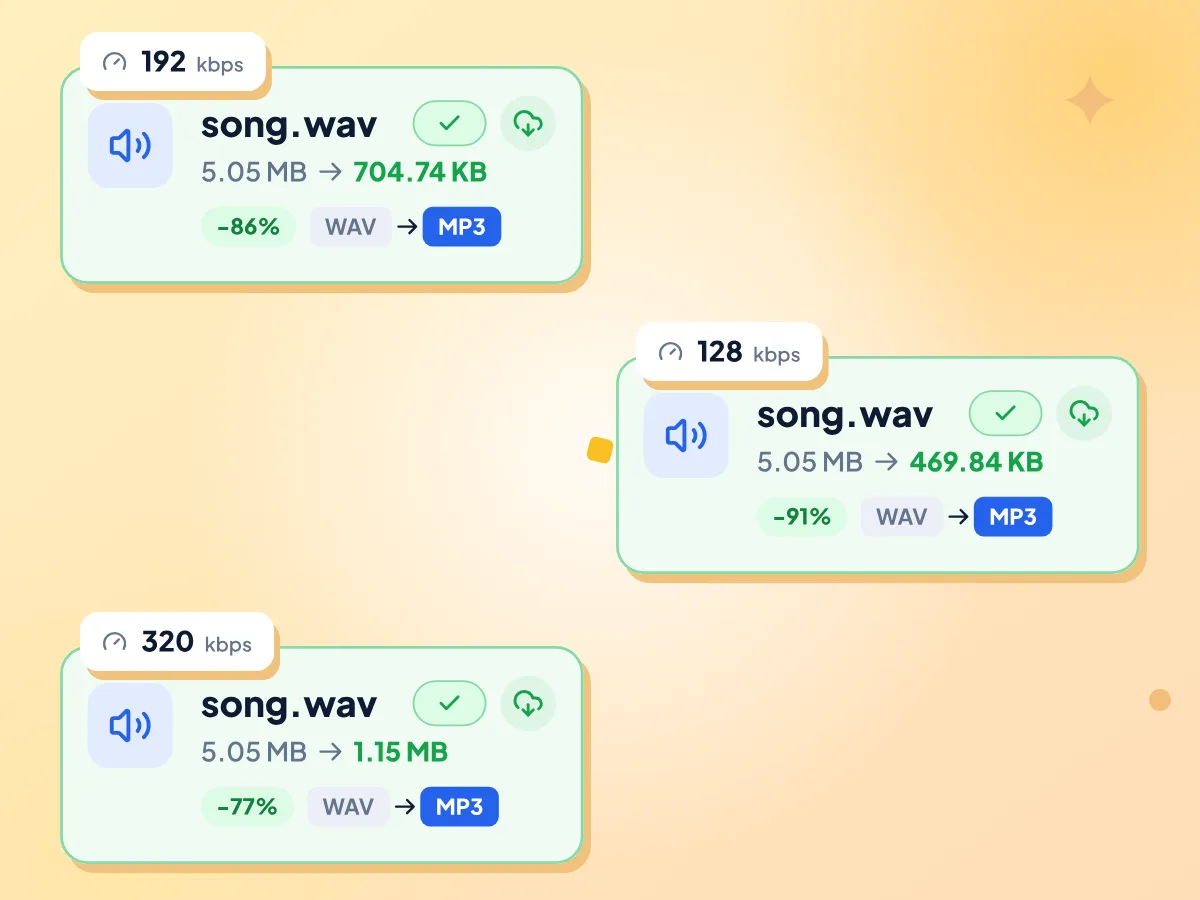
A 100 MB CD-quality WAV becomes about 14 MB as a 192 kbps MP3. That fits under most email attachment limits.
- CD-quality WAV: 192 kbps is 7x smaller
- CD-quality WAV: 128 kbps is 11x smaller
- CD-quality WAV: 320 kbps is 4.4x smaller
Universal MP3 Compatibility
MP3 files play on phones, computers, car stereos and nearly every media player.
WAV to MP3 Conversion FAQs
Common questions about turning WAV audio into MP3
What bitrate should I choose when converting WAV to MP3?
Use 128 kbps for voice and podcasts, 192 kbps for most music, and 320 kbps when you want the MP3 as close to the WAV as MP3 gets. Auto writes about 256 kbps.
How much smaller will my file be after converting WAV to MP3?
About 4x to 11x smaller for a CD-quality WAV, depending on the bitrate. A 3-minute song is about 30 MB as WAV, about 3 MB at 128 kbps, 4 MB at 192 kbps and 7 MB at 320 kbps. A 24-bit or 96 kHz WAV starts out bigger, so it shrinks even more.
Will converting WAV to MP3 make the audio sound worse?
MP3 is a lossy format, so some audio information is discarded during encoding. At 192 kbps or higher, the difference is inaudible to most listeners on typical playback systems. If you need to retain the original quality for editing, keep your WAV master and only distribute the MP3.
Is 320 kbps MP3 as good as WAV?
Not quite, but it is close. WAV keeps every detail of the original recording, while a 320 kbps MP3 drops some detail that most people can't hear on everyday speakers or headphones. Keep the WAV for editing and share the MP3.
Can I convert a 24-bit WAV to MP3?
Yes. A 24-bit WAV converts the same way as a 16-bit one. MP3 does not store a bit depth, so there is no setting for it. Keep the 24-bit WAV if you plan to edit the audio later.
Does my WAV file get sent to your servers?
No. Your WAV file never leaves your device. The MP3 is made inside your browser, and nothing is uploaded or stored on a server.
What does Auto mean when converting WAV to MP3?
For 44.1 and 48 kHz files, Auto writes about 256 kbps, whatever the WAV was. A 30-second CD-quality stereo WAV (5.05 MB) came out at 939.63 KB, 82% smaller. Pick 128 or 192 kbps for smaller files, or 320 kbps for the highest setting.
Can I convert a 96 kHz WAV to MP3?
Yes. A 24-bit 96 kHz stereo WAV converted without errors and came out as a 48 kHz stereo MP3, because the MP3 encoder cannot use 96 kHz. A 16.48 MB test file shrank to 939.04 KB on Auto.
Does WAV to MP3 keep the song title and artist?
Yes. Title and artist stored in the WAV carry over to the MP3 as tags. Many WAV files carry none, so the MP3 may start untagged. Add them in a tag editor if you need them.
Is there a size limit for WAV to MP3?
Each WAV can be up to 500 MB, and you can add as many files as you like. They convert one at a time, so a long batch takes a while. Two or more results download together as one ZIP.
Why Convert WAV to MP3?
Musicians & Podcasters:
- Make MP3 copies of a finished WAV master for previews, SoundCloud or your website
- Send MP3 demos to collaborators and clients who don't need uncompressed source files
- Convert recorded podcast WAV sessions to MP3 for RSS feed hosting and smaller storage costs
Content Creators & Marketers:
- Convert WAV background music to MP3 for YouTube videos and social media posts
- Shrink audio files for your website so pages load faster
- Share MP3 sound clips via email or Slack without attachment size limits being exceeded
Personal & Everyday Use:
- Convert WAV recordings from your microphone or voice recorder to MP3 for storage on your phone
- Send MP3 versions of your music on WhatsApp, Telegram or iMessage
- Archive a large WAV library as MP3 to free up disk space while keeping your music accessible
Explore More Tools
Discover other free tools that work great alongside this one