

Convert AAC to MP3 Free — Works Everywhere
Turn .aac audio files into MP3, which plays on almost any phone, computer or car stereo. No iTunes needed.
Drop your audio files here
AAC
Max file size: 500 MB · Multiple files supported
How to Convert AAC to MP3:
Drop your .aac files into the converter, or click to pick them.
Each file can be up to 500 MB.
Pick your MP3 output bitrate — 256 or 320 kbps is recommended to minimize quality loss
Convert and download your MP3 file, ready to play on any device
AAC vs MP3: What Changes
Understanding the differences between AAC and MP3 helps you choose the right format for your needs.
| Specification | AAC | MP3 |
|---|---|---|
| Compression | Lossy | Lossy |
| Quality | Very Good | Good |
| Transparency | No | No |
| Animation | No | No |
| File Size | Small | Small |
Why convert from AAC?
- Lossy — audio data is discarded
- Patent licensing restrictions
- Less universal than MP3 on older hardware
Why choose MP3?
- Universal compatibility
- Small file sizes
- Good quality at reasonable bitrates
When to use AAC
When you want better quality than MP3 at the same file size, especially in the Apple ecosystem.
When to use MP3
When you need universal audio compatibility and reasonable file sizes.
AAC to MP3 Conversion Features
Turn AAC into MP3 for players and apps that don't read AAC
Smart AAC Decoding
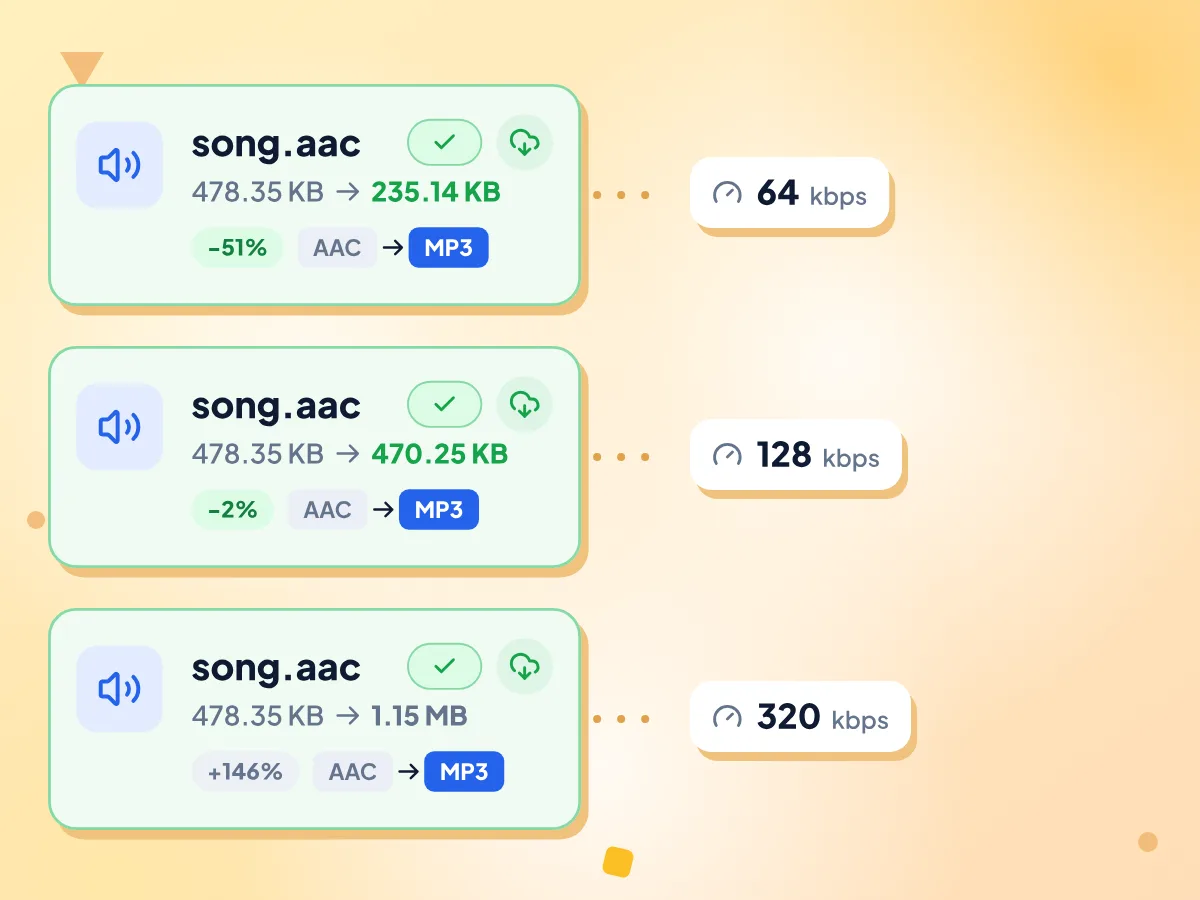
The converter decodes your AAC and writes a new MP3 at the bitrate you pick. Each re-encode loses a little quality, so higher bitrates stay closer to the source but make bigger files.
- Seven bitrates, 32 to 320 kbps
- Auto is about 256 kbps
- Cover art is not copied
Comparable File Sizes
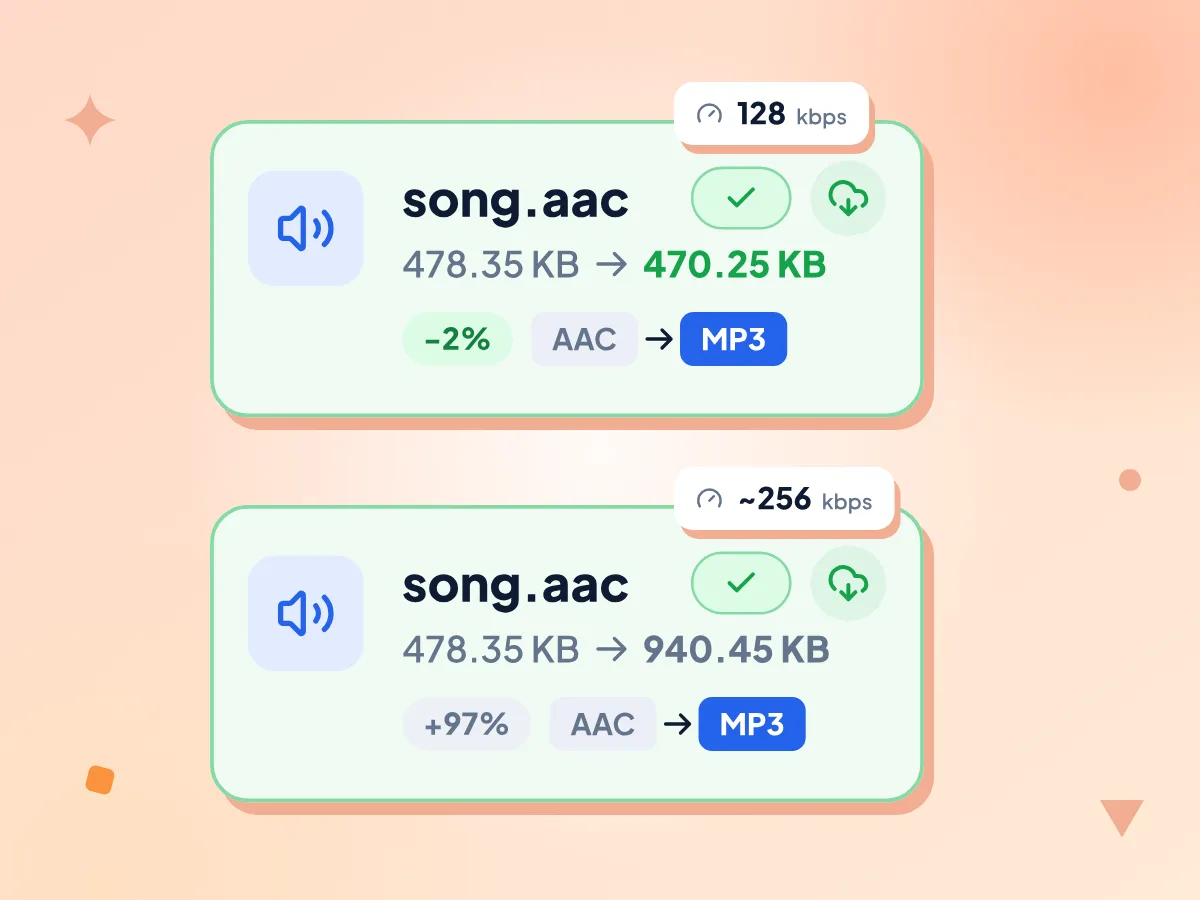
At the same bitrate, AAC and MP3 files come out about the same size. Auto writes about 256 kbps, so pick 128 kbps to keep the MP3 of a 128 kbps AAC just as small.
- Same bitrate gives about the same size
- Auto nearly doubles a 128 kbps AAC
- Size chip shows each file's change
Universal Platform Support
MP3 plays on Windows, Android, Linux and most car stereos, and on older MP3 players that can't read AAC.
AAC to MP3 Conversion FAQs
Common questions about converting AAC files to MP3
What is the difference between AAC and MP3?
Both are lossy formats, but AAC (Advanced Audio Coding) compresses sound more efficiently than MP3. At the same bitrate AAC usually sounds better, so 128 kbps AAC sounds about like 160 kbps MP3. Apple uses AAC, while MP3 plays on more older devices and apps.
Why can't I play my AAC files on my Android phone or Windows PC?
Most Android phones and recent Windows versions can play AAC, but some older devices, car stereos and apps can't. MP3 plays on nearly all of them, so converting fixes the problem.
Can I convert Apple Music AAC files to MP3?
No. Apple Music streams and downloads use FairPlay DRM, which blocks conversion. This page takes unprotected .aac files only. Voice Memos, GarageBand and iTunes imports usually save .m4a, which is not accepted here.
Will my audio quality drop when converting AAC to MP3?
Yes, a little. Both formats are lossy, so decoding the AAC and encoding an MP3 adds a second round of compression. Picking 256 or 320 kbps keeps the loss small, but the MP3 comes out bigger: a 128 kbps AAC grew 146% at 320 kbps in our test.
What is an M4A file and is it the same as AAC?
M4A is an MPEG-4 audio file that usually holds AAC sound, so the audio inside is often the same. The file type differs, though, and this page accepts .aac files only, so an .m4a file is rejected.
Is this converter safe for private audio recordings?
Yes. The conversion runs in your browser, and your audio files are never uploaded or stored on a server. Your recordings stay on your device.
What does Auto mean when converting AAC to MP3?
For 44.1 and 48 kHz files, Auto writes about 256 kbps whatever the AAC bitrate was. A 128 kbps AAC grew from 478.35 KB to 940.45 KB in our test. Pick 128 kbps in the Bitrate menu to keep the size close to the original (470.25 KB).
Can I convert M4A files to MP3 here?
No. This page accepts .aac files only, so an .m4a file is rejected with an unsupported file type message. Each .aac file can be up to 500 MB. Drop a raw .aac file instead.
Is there a limit on how many AAC files I can add?
No. There is no file-count limit, so drop as many .aac files as you like. They convert one after another. When two or more are done, Download All gives one ZIP named pixconvert-batch.zip.
Does AAC to MP3 keep the cover art?
No. The converter keeps only the audio stream, so any cover picture is left out of the MP3. Add the artwork again in your music app or a tag editor after converting.
Why Convert AAC to MP3?
Cross-Platform Users:
- Convert .aac files to MP3 for Windows apps and MP3 players that don't read AAC
- Put .aac podcasts or audiobooks on a USB stick as MP3 for a car stereo
- Convert .aac voice recordings to MP3 for an MP3 player or a Windows PC
Content Creators & DJs:
- Convert .aac tracks to MP3 for DJ software or older DJ gear that only reads MP3
- Convert .aac music to MP3 before adding it to a video editor that won't import it
- Send clients MP3 copies of .aac audio so it opens on their computers
General Users & Archives:
- Convert .aac voice recordings to MP3 to share on WhatsApp or Telegram
- Keep MP3 copies of your .aac files for apps and devices that only play MP3
- Upload MP3 files to podcast hosts that ask for MP3
Explore More Tools
Discover other free tools that work great alongside this one