

Convert OGG to MP3 for Any Device
Convert OGG Vorbis files to MP3 so they play on iPhones, in iTunes and on most car stereos. Pick a bitrate and add as many files as you like.
Drop your audio files here
OGG
Max file size: 500 MB · Multiple files supported
How to Convert OGG to MP3:
Click the upload area or drag your OGG files in.
You can add as many as you like, up to 500 MB each.
Pick a bitrate in the Bitrate menu.
64 or 96 kbps is enough for speech, and 128 or 192 kbps suits music. Higher settings keep more detail but can make the MP3 bigger than the OGG.
Click Convert All, then download your MP3.
With two or more files, Download All saves them as one ZIP.
OGG vs MP3: What Changes
Understanding the differences between OGG and MP3 helps you choose the right format for your needs.
| Specification | OGG | MP3 |
|---|---|---|
| Compression | Lossy | Lossy |
| Quality | Good to Very Good | Good |
| Transparency | No | No |
| Animation | No | No |
| File Size | Small | Small |
Why convert from OGG?
- Not supported in Safari before version 18.4
- Limited hardware player support
- Not compatible with iTunes or Apple Music
Why choose MP3?
- Universal compatibility
- Small file sizes
- Good quality at reasonable bitrates
When to use OGG
When you need a royalty-free audio format for web applications, games, or Linux/Android workflows.
When to use MP3
When you need universal audio compatibility and reasonable file sizes.
OGG to MP3 Conversion Features
Turn OGG audio into MP3 for apps and devices that won't open OGG
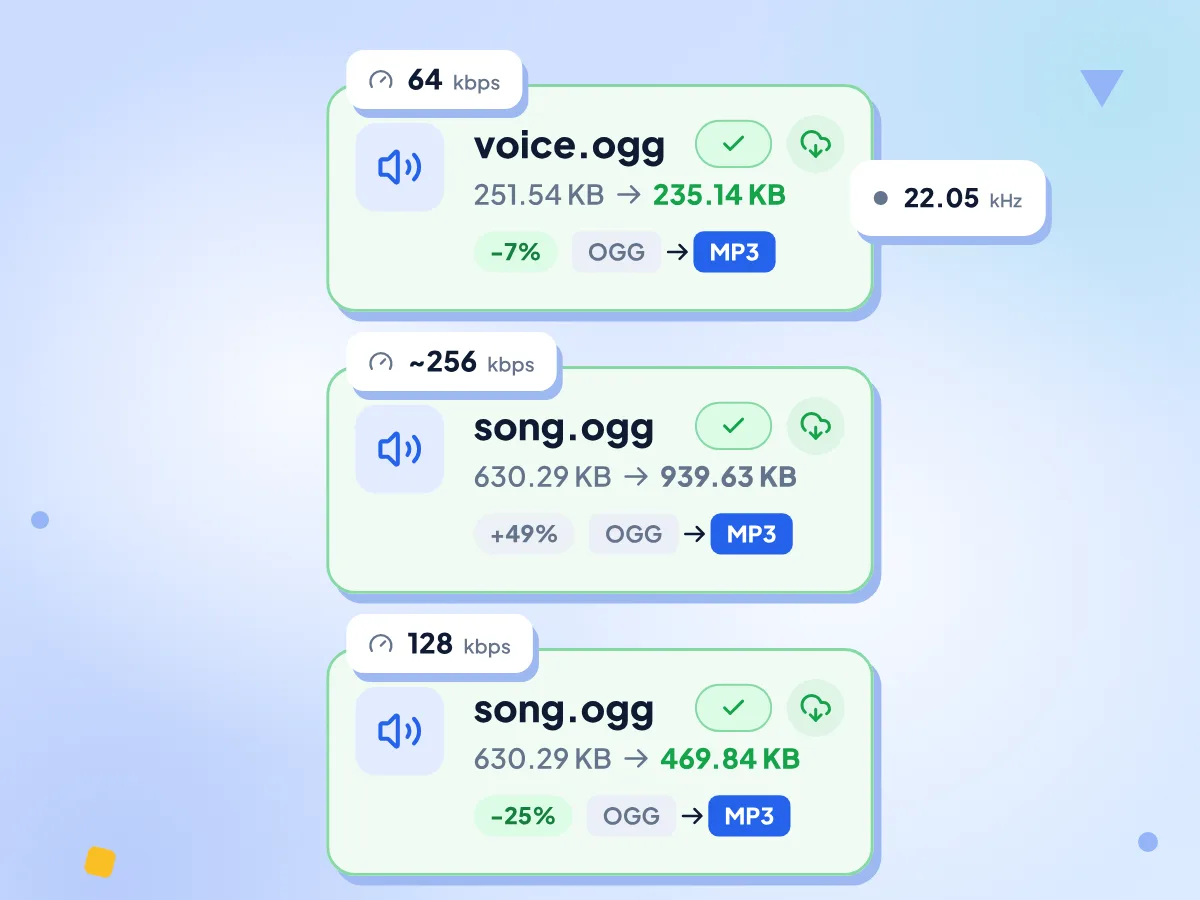
Optimized Bitrate Output
Pick an MP3 bitrate from 32 to 320 kbps, or keep Auto. Low settings make small files for speech, and higher ones keep more detail in music.
- Bitrate menu: 32 to 320 kbps
- Auto is about 256 kbps
- Mono voice files stay mono
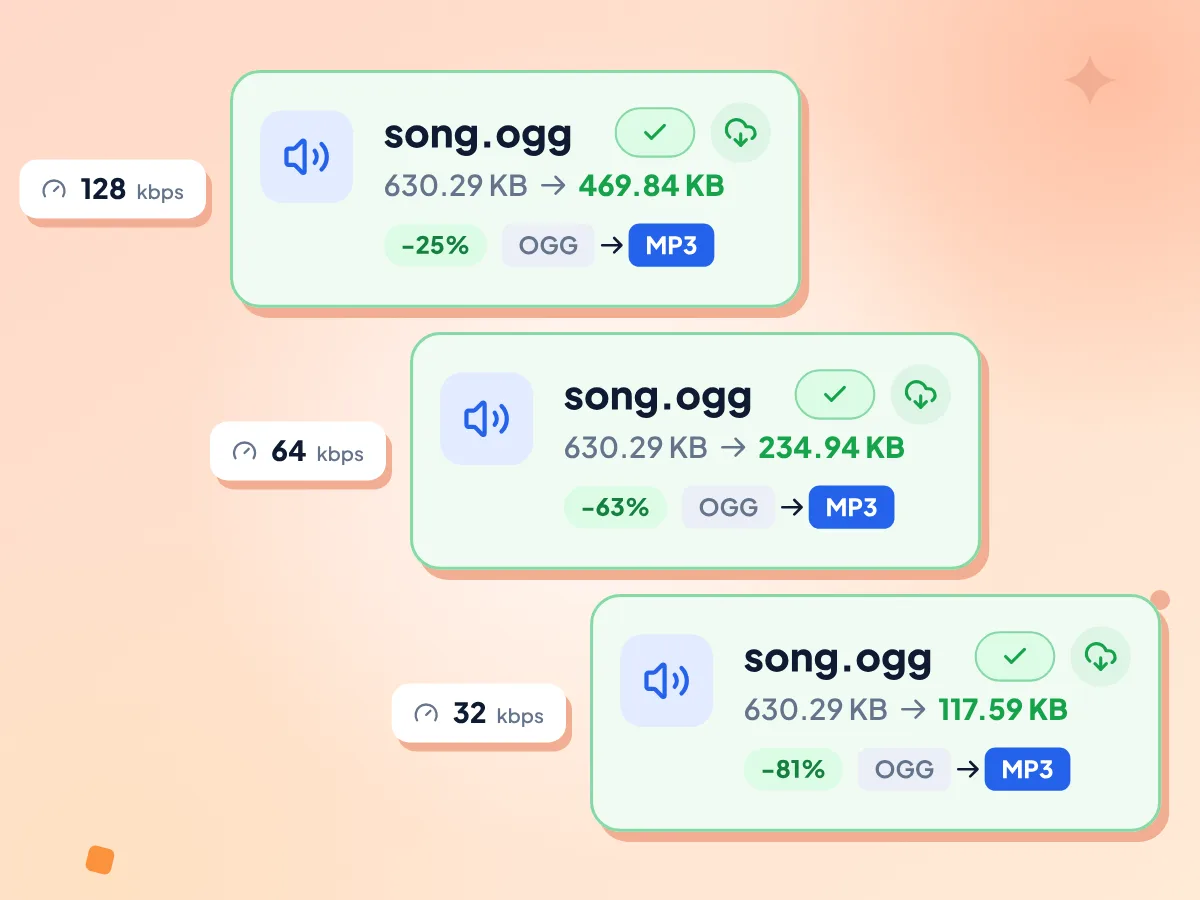
Compact MP3 Output
A 172 kbps OGG song shrank 25% at 128 kbps in our test but grew 12% at 192 kbps. Pick 128 kbps or lower when you want a smaller file to share.
- 172 kbps OGG: 128 kbps is 25% smaller
- 172 kbps OGG: 64 kbps is 63% smaller
- Every tile shows the size change
Maximum Device Compatibility
MP3 plays on iPhones, Android phones, Windows PCs, Macs and most car stereos, including many that can't open OGG.
OGG to MP3 Conversion FAQs
Helpful answers about converting OGG Vorbis audio to MP3
Why can't my iPhone or iTunes play OGG files?
iTunes and the Apple Music app don't import OGG files, and Safari on iPhone fully supports OGG only from iOS 18.4. Converting to MP3 makes the file work in all of them without extra apps.
Does converting OGG to MP3 reduce audio quality?
Yes, because both OGG and MP3 are lossy codecs. Re-encoding from one lossy format to another always introduces some additional quality loss. To keep this minimal, use a high output bitrate (256 or 320 kbps MP3). If audio quality is critical, work from a lossless source like WAV or FLAC instead.
What MP3 bitrate gives the best balance of quality and file size?
For music, start at 128 kbps. In our test a 172 kbps OGG came out 25% smaller at 128 kbps and 12% bigger at 192 kbps. For voice, 64 kbps is usually enough. A bitrate above the OGG's own makes a bigger file without adding detail.
Can I play OGG files on Android without converting?
Yes, most Android devices support OGG Vorbis natively in the default music player. If you only need Android playback, conversion is unnecessary. Convert to MP3 when you need the file to work across all platforms including iOS, Windows Media Player, and car audio systems.
How do I convert multiple OGG files to MP3 at once?
Select or drag several OGG files in at once, then click Convert All. They convert one after another, and Download All saves two or more as one ZIP. You can also download each file on its own.
Is this OGG to MP3 converter safe to use?
Yes. Your OGG files are converted inside your browser and never leave your device. Nothing is uploaded or stored online.
What does Auto mean when converting OGG to MP3?
Auto aims for about 256 kbps whatever the OGG bitrate was, and tops out at 160 kbps for 22.05 kHz files. A 172 kbps OGG grew 49% in our test, from 630.29 KB to 939.63 KB. Pick 128 kbps to get a file 25% smaller (469.84 KB).
Why did my MP3 lose the title and artist from the OGG?
The converter does not copy tags from OGG files, so the MP3 has no title or artist. We confirmed this with a tagged OGG. Add the tags again in a tag editor after converting.
How many OGG files can I convert at once, and how big can they be?
There is no limit on the number of files, and each OGG can be up to 500 MB. Files convert one after another, not in parallel. Two or more finished files download as one ZIP.
What bitrate should I pick for an OGG voice recording?
Try 64 kbps for speech if size matters most. A mono voice OGG converted at 64 kbps came out at 235.14 KB for 30 seconds and stayed mono. Auto gave about 160 kbps for the same file, over twice the size of the OGG.
Why Convert OGG to MP3?
Apple Device Users:
- Convert OGG game audio or music files to MP3 to play them on an iPhone or iPad without third-party apps
- Import OGG recordings into iTunes or Apple Music by converting to MP3 first
- Copy OGG audiobooks or podcasts to an iPod as MP3
Content Sharers & Collaborators:
- Convert OGG sounds from a game project to MP3 to share with people who can't open OGG
- Send OGG voice recordings as MP3 to contacts on messaging apps that don't support OGG playback
- Use OGG music in video editors and upload forms that take MP3 but not OGG
General Compatibility Fixes:
- Play OGG music downloaded from open-source or Creative Commons libraries on car stereo systems
- Put OGG soundtracks from open-source games on an MP3 player
- Convert OGG Linux system sounds or audio exports to MP3 for cross-platform use
Explore More Tools
Discover other free tools that work great alongside this one